Trademark Class 9: The Class That Covers Most of the Tech World
When you file a trademark, you have to pick a class. For most tech founders, software developers, and app makers, that class is trademark class 9.
Picking the wrong class doesn’t just slow you down. It leaves your core product unprotected and invites office actions from the USPTO.
So does not knowing when you need more than one class.
Here’s what Class 9 covers, who it’s for, and the distinctions you need before you file.
Quick Facts: Trademark Class 9
- Classification system: Nice Classification (used by USPTO, WIPO, and 150+ countries)
- What it covers: Downloadable software, electronics, mobile apps, scientific instruments, safety equipment
- Filing fee: ~$350/class (USPTO)
- Who needs it: Software developers, app makers, hardware companies, game studios
- Common companion classes: Class 41 (entertainment/online services), Class 42 (SaaS/non-downloadable software), Class 28 (physical games and toys)
- Specimen required: Yes — must show the mark in use with the actual goods, in order to finalize the registration
- International scope: A US Class 9 registration does not automatically protect you in other countries
Key Definitions
Nice Classification: The international system for classifying goods and services in trademark filings, maintained by WIPO and used in 150+ countries. Both the USPTO and international trademark offices use this system, so the class numbers carry over if you ever file abroad.
Specimen: The evidence you submit to the USPTO showing your mark is actually in use with the goods or services you’re registering. For Class 9 software, this is typically an App Store listing or a webpage showing the mark with a download button.
Identification of Goods (ID): The written description of what your trademark covers within a class. The more specific and accurate your ID, the fewer office actions you’ll receive from the USPTO examiner.
Office Action: A formal USPTO response raising issues with your application. Vague IDs and incorrect specimens are two of the most common triggers. If you receive one, here’s how to respond.
What Is Trademark Class 9?
File in the wrong class and the USPTO won’t fix it for you. You’re left with a gap in protection where your actual product lives.
The Nice Classification system uses 45 classes to cover every type of product and service you can trademark. Class 9 is officially “electrical and scientific apparatus,” which understates it.
In practice, it’s the home for computers, software, mobile apps, electronic devices, audio/visual equipment, measuring instruments, and safety devices.
Both the USPTO and WIPO use this system. The class numbers translate internationally.
This means that Class 9 registration in the US corresponds to Class 9 everywhere the Nice Classification applies. If you’re planning international protection, you’re building on the same foundation.
The key concept that drives Class 9 eligibility for software: the word “downloadable.” If a user installs it, it’s Class 9. If it runs in a browser with nothing to install, it’s not.
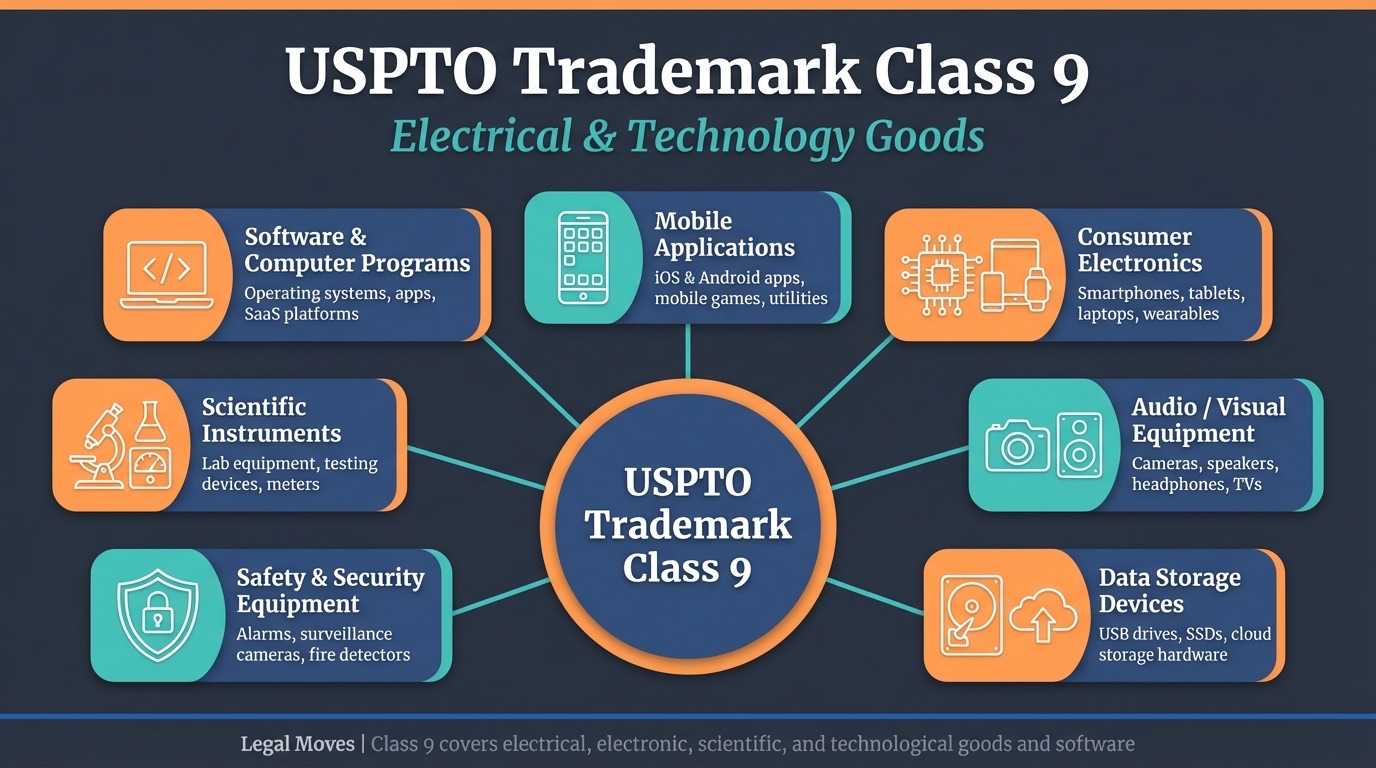
What Class 9 Covers: Software, Apps, Electronics, and More
Class 9 is broad, but the categories are specific. If your product fits one of these, you need to be here.
Downloadable software of all kinds falls here. Business apps, productivity tools, development tools, security software. If someone downloads it and installs it, it’s Class 9.
Mobile applications for iOS and Android are Class 9. That includes games, utilities, social apps, fitness apps, and anything else distributed through the App Store or Google Play.
Video games and game software live in Class 9 as well. Downloadable PC games, console game software, and mobile games are all covered. If you’re trademarking a video game brand, Class 9 is your starting point. Physical game cartridges and discs fall here as hardware products too.
Computer hardware and peripherals — keyboards, mice, monitors, and graphics cards are Class 9.
Electronic devices like smartphones, tablets, wearables, VR headsets, and AR glasses belong here too.
Audio/visual equipment including cameras, headphones, and speakers are Class 9 goods. So are batteries, chargers, cables, and power accessories.
Also in Class 9 are scientific instruments and safety equipment like alarms and smoke detectors.
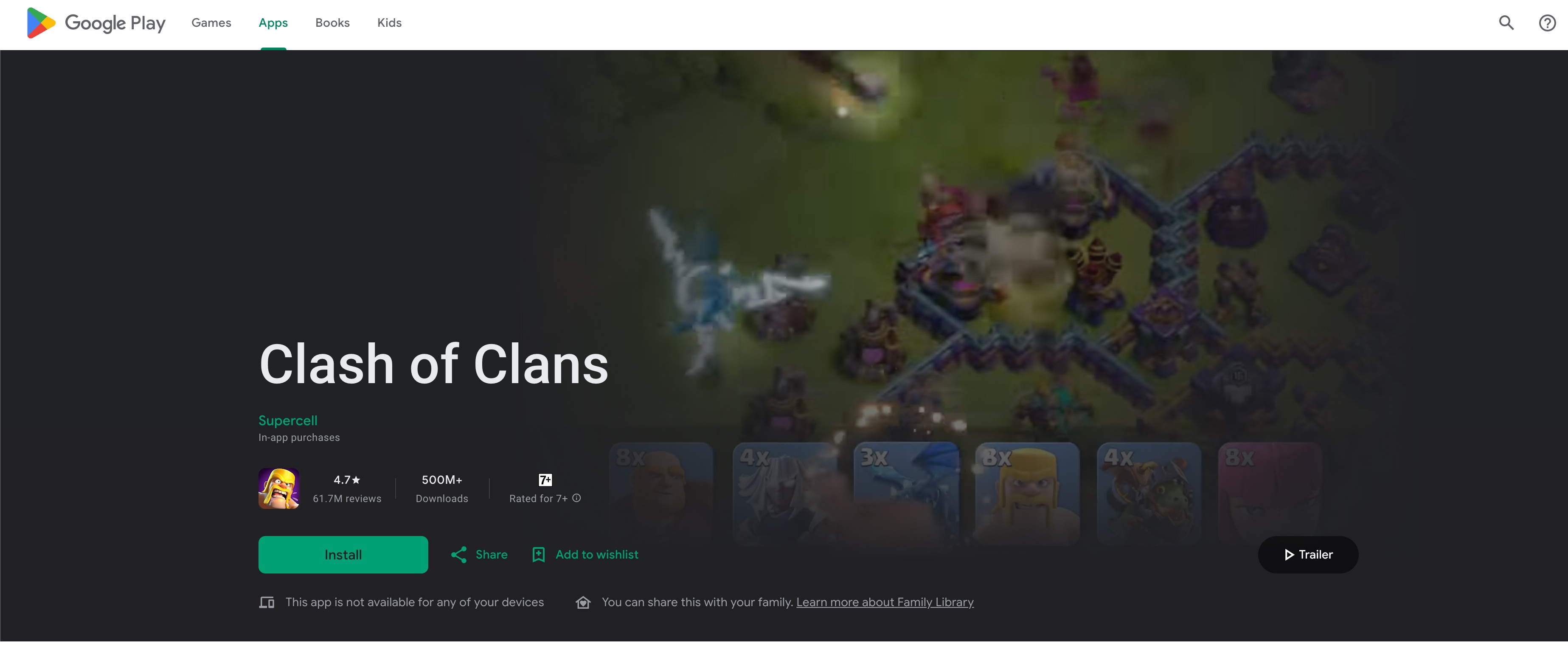
One word that matters to the USPTO: “downloadable.” Your goods ID should use it, and your specimen needs to support it. A screenshot of your app’s App Store listing showing the mark and a download button is the standard specimen for software.
A VS Code extension, a SaaS desktop client, a downloadable mobile game: all Class 9, all require that downloadable connection.
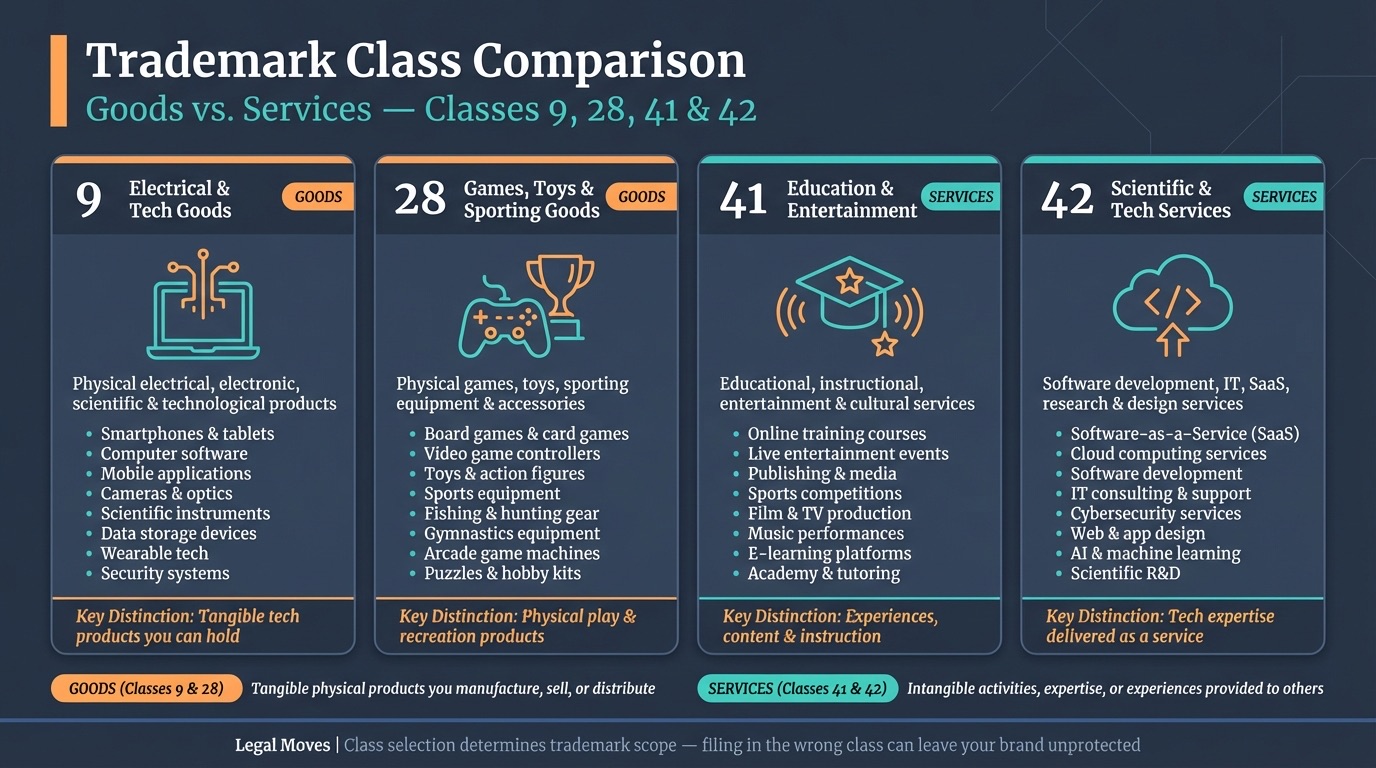
Class 9 vs. Class 28, 41, and 42: Where Most People Get It Wrong
Most tech trademark mistakes happen at the class boundaries. Here’s where each line is drawn.
Class 28: Toys and Sporting Goods
Class 28 covers physical game products. Board games, card games, tabletop game accessories, and physical game controllers sold as toys all live in Class 28, not Class 9.
If you run a board game company and want to protect your brand, Class 28 is your primary class.
Class 9 handles the electronic side. A company making a game with both a physical board version and a downloadable digital version needs both classes.
Class 41: Education and Entertainment Services
Class 41 is about services, not products. Online gaming services, streaming entertainment platforms, eSports tournament operations, and online educational services all belong here.
The key distinction: Class 41 covers the act of providing content or entertainment, not the product delivering it. A company running an online multiplayer gaming platform needs Class 41 for the service.
If they also distribute a downloadable game client, they would typically need Class 9 alongside it.
Class 42: Computer and Scientific Services
This is where the most costly confusion happens.
Class 42 covers non-downloadable software delivered as a service. Cloud computing, hosting, SaaS platforms, API access, browser-based tools.
If your product is 100% browser-based and users never actually download anything, you are in Class 42 territory, not Class 9.
Filing only in Class 9 for a cloud-based SaaS product leaves your core offering unprotected and your application will likely be rejected for being unable to provide evidence of use as a downloadable software product.
The download distinction is real and the USPTO enforces it. A cloud storage platform, a browser-based design tool, a web app that runs entirely in the browser — these are Class 42 goods. If there’s also a downloadable client or desktop app, you can add Class 9, as well.
The practical takeaway: Most software companies could benefit from at least two classes.
A mobile app or online video game startup typically needs Class 9 for the app/game itself and Class 41 for the entertainment or service layer (online multiplayer, etc.).
A SaaS company usually needs Class 42 for the service and Class 9 if a downloadable client exists. Each class costs a separate filing fee, but the protection is very useful and protecting against gaps in that protection can matter.
How to File a Class 9 Trademark
Two decisions determine whether your Class 9 filing goes smoothly: the filing basis and the ID of goods.
Step 1: Choose your filing basis. Use TEAS Plus at roughly $350 per class if you can select your ID from the USPTO’s pre-approved ID Manual. Use the more expensive free-form ID drafting tool if you need something more customized (less common).
Then you need to choose whether you’re filing based on your current use in commerce (1a) or based on an intent to use the trademark in commerce later (1b). Other bases exist for bringing an international mark to the US, as well.
For a full walkthrough of the filing process, see How to Trademark a Game.
Step 2: Write a specific ID of goods. My strategy is to usually go both broad (“downloadable game software”), and also specific(“downloadable player-versus-player computer game software”). That strategy will typically cover you.
You just want to make sure you’re not claiming things that you aren’t actually using in commerce (if you’re filing on a 1a basis) or that you won’t actually use in commerce later on (if you’re filing on a 1b basis).
Step 3: Prepare your specimen. If you’re filing based on use in commerce, you’ll need to provide a specimen showing the use.
For downloadable software, use a screenshot of your App Store or Google Play listing showing the mark and a download button. Include the URL and the date you accessed the page where the application tells you. For hardware, use a product photo with the mark clearly visible on the item or packaging.
Not sure whether to file yourself or hire help? Here’s what a trademark attorney costs and what you actually get for it.

Related Questions About Trademark Class 9
Can I trademark a mobile app under Class 9? Yes. Downloadable mobile apps — iOS, Android, or otherwise — are Class 9 goods. Make sure your ID specifies “downloadable mobile application” and describes what the app does.
Does a video game trademark go in Class 9 or Class 28? Downloadable video game software goes in Class 9. Physical board games and tabletop game products go in Class 28. If you have both a digital and physical version, you likely need both classes.
What if my software is both downloaded and cloud-based? You will usually file in both Class 9 and Class 42. Class 9 covers the downloadable component. Class 42 covers the non-downloadable service. One class alone will leave part of your product unprotected.
Is a VR headset a Class 9 product? Yes. VR and AR headsets are electronic devices and fall under Class 9. The software running on the headset, if downloadable, is also Class 9.
Can I add more classes to my trademark later? No. You cannot add classes to an existing registration. You would need to file a separate application for each additional class. Think through all relevant classes before your initial filing.

FAQ
Is Class 9 the right class for my software?
Yes, if your software is downloadable. Desktop apps, mobile apps, and downloadable game software all belong in Class 9. If your product is browser-based with nothing the user actually downloads, you likely need Class 42 instead.
What’s the difference between Class 9 and Class 42?
The key distinction is download vs. non-download. Class 9 covers downloadable software. Class 42 covers non-downloadable software delivered as a service: SaaS platforms, cloud computing tools, and browser-based applications.
Do I need more than one trademark class?
Probably. Most tech products touch two or three classes. A mobile app startup typically needs Class 9 for the app and Class 41 for the entertainment or service offering. A SaaS company often needs Class 42 for the service and Class 9 if there’s a downloadable client. Filing one class when your product spans two can leave gaps.
What’s a good specimen for a Class 9 trademark?
For downloadable software, an App Store or Google Play listing works well. A website page showing the mark next to a download button also works. Include the URL and date accessed where required in the application. For hardware, use a photo of the product with the mark visible on the device or packaging.